Numerate Start free trial
Preconstruction & project controls

Estimates you can defend.

Numerate turns building dimensions into quantities with 101 engineering formulas organized by CSI division, then carries the same numbers into CPM schedules, proposals, pay applications and an owner portal.

No credit card required. Plans from $49 a month with 3 users included, plus applicable tax.

03Slab-on-gradeLive formula
Concrete, incl. 5% waste–
Finish area–
Reinforcing steel–
Saw-cut joints at 30× thickness–
CY = L × W × (t ÷ 12) ÷ 27 × 1.05 · ACI 302.1R joint spacing · ASTM A615 bar weight 0.668 lb/ft
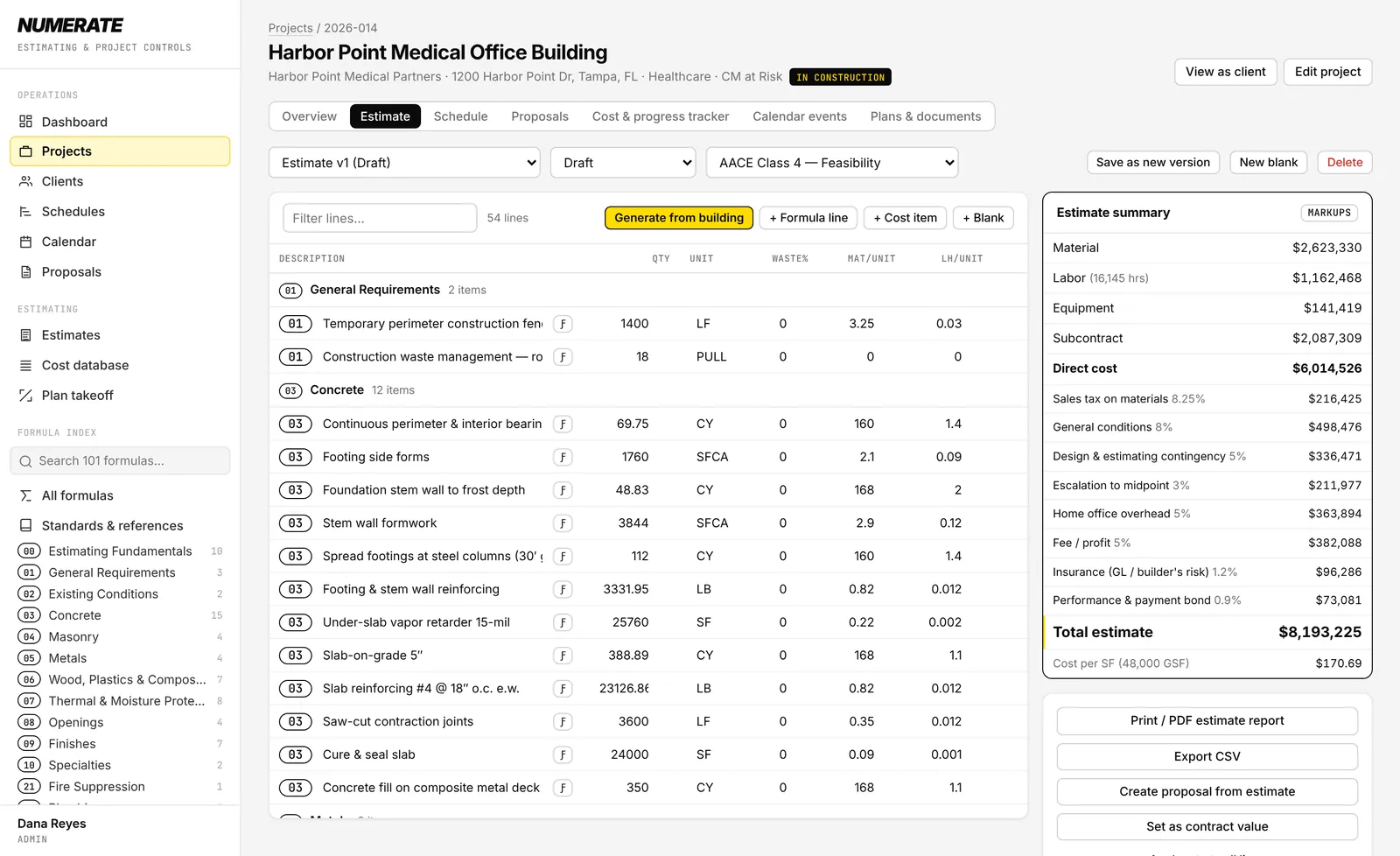
Estimate · CSI divisions with live markups
Numerate estimate screen: line items grouped by CSI division, each tied to the formula that computed its quantity, with an estimate summary showing direct cost, markups and total.

A ground-up estimate generated from building dimensions. Sample project.

Who it's for

General contractors and construction managers who have outgrown spreadsheets and small-crew apps, and want institutional-grade estimating without an enterprise rollout.

Estimating engine

Every quantity shows its work.

Each line item keeps the formula and inputs that produced it. Change the slab thickness or the rebar spacing and the quantity, cost and total update together.

  • 101 formulas across CSI divisions 00–33, from footings and CMU grout to sprinkler heads, duct weight and Manning pipe capacity
  • Ground-up generator builds about 55 line items from length, width, stories and structural system
  • Your own cost database for material, labor hours, equipment and subcontract pricing
  • Markups stacked the way estimators review them: tax, general conditions, contingency, escalation, overhead, fee, insurance and bond
  • AACE estimate classes on every version
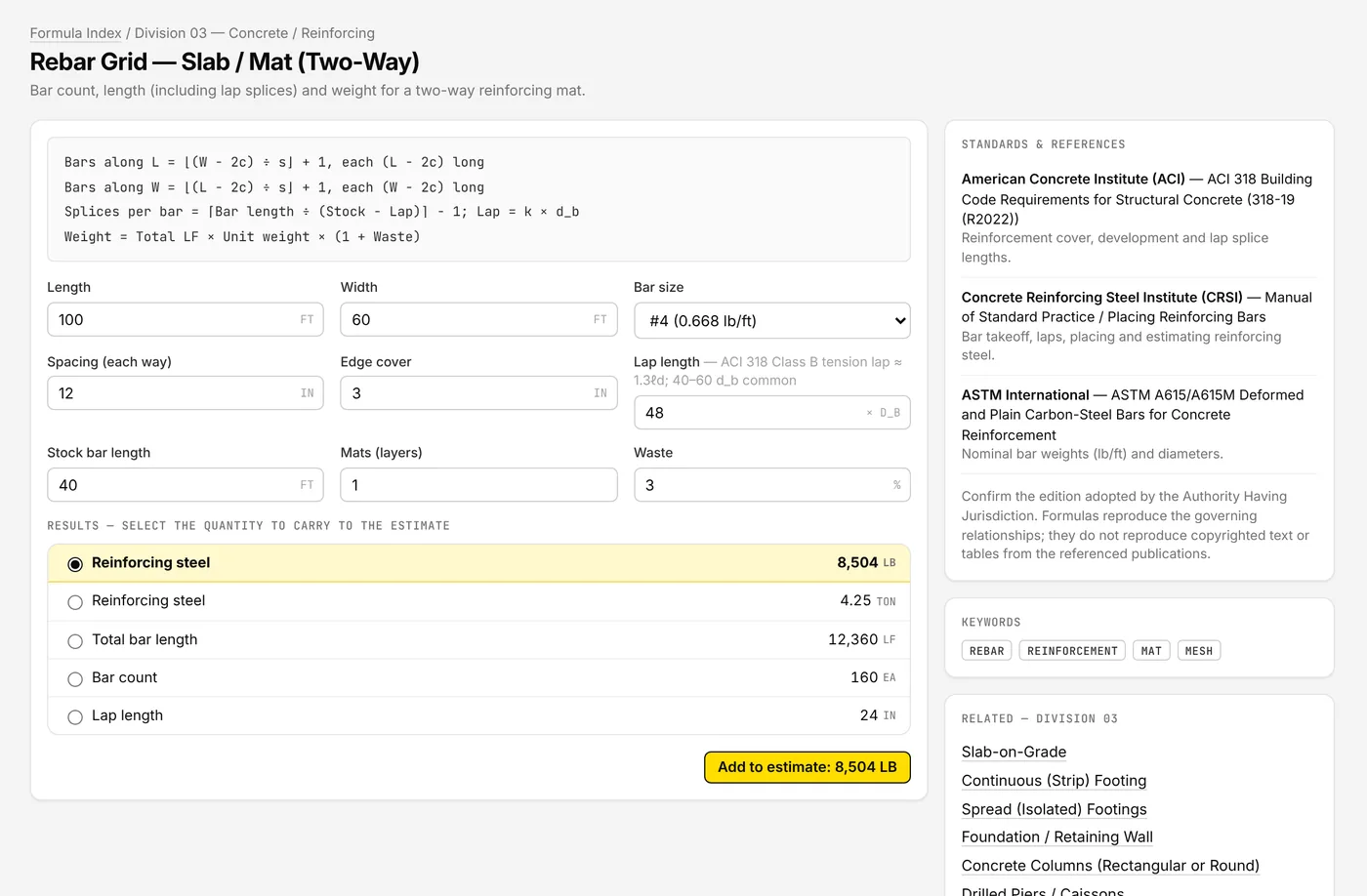
Formula library · Rebar grid, two-way
Numerate formula page for a two-way rebar grid, showing the formula, inputs, results and the ACI, CRSI and ASTM references it draws on.
Scheduling

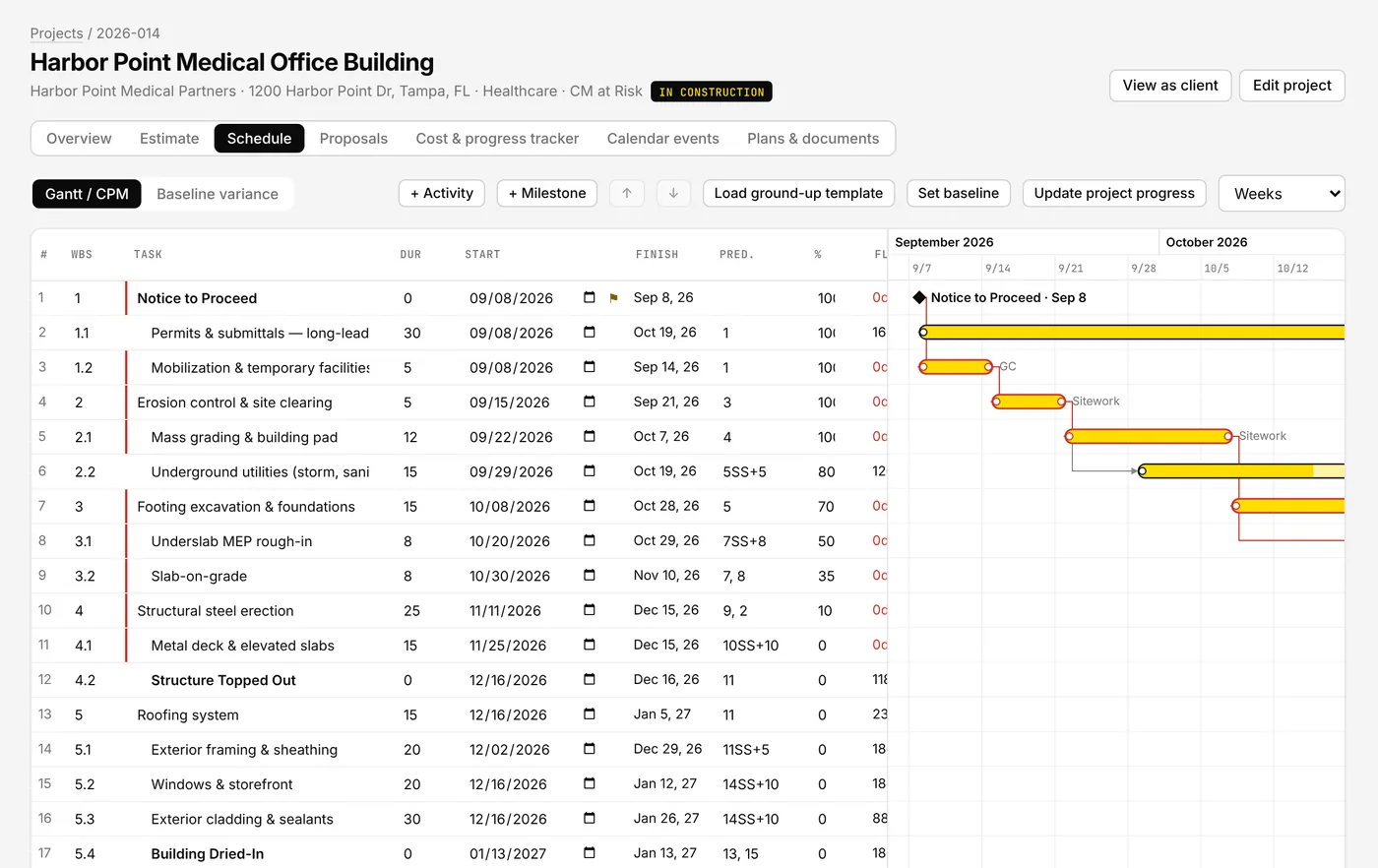
CPM schedules, not bar charts.

Forward and backward pass, total float and the critical path, calculated on your work calendar with holidays.

  • Finish-to-start, start-to-start, finish-to-finish and start-to-finish logic with lags
  • Drag bars to set start constraints; dependent work moves with them
  • Baselines with start and finish variance by activity
  • A 36-activity ground-up template to start from
Schedule · Gantt with critical path
Numerate Gantt chart with activity rows, predecessors, float and the critical path outlined in red.
Cost & progress

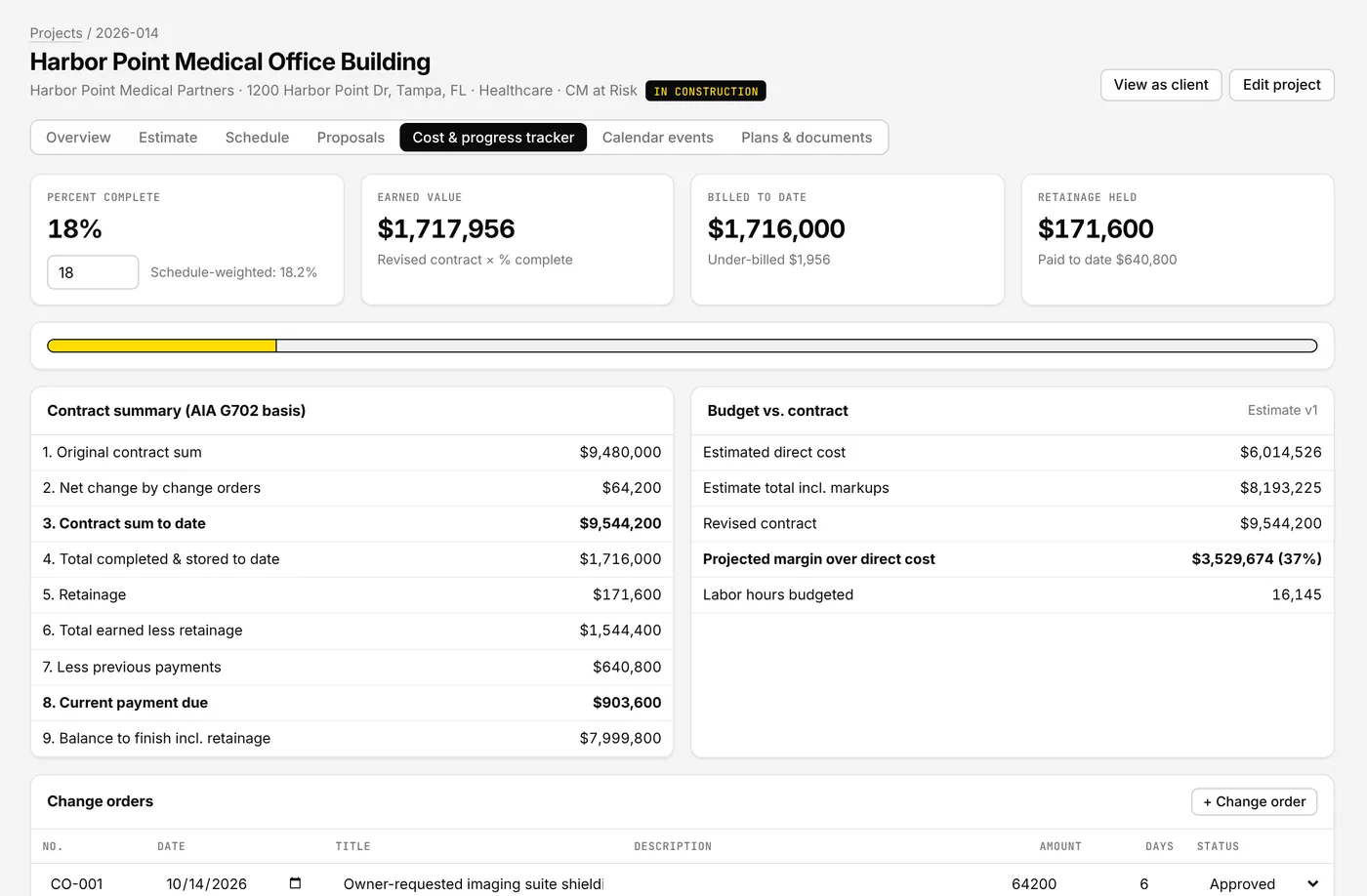
The money, on one page.

Contract, change orders, billing and retainage roll up in the order of the AIA G702 form, next to your estimate's budget and margin.

  • Change order log with approved and pending totals
  • Pay applications with retainage and payment status
  • Earned value against percent complete, with over- and under-billing
  • Daily reports with weather and crew counts
Cost & progress tracker
Numerate tracker showing percent complete, earned value, billed to date, retainage, a G702-style contract summary and budget versus contract.
Owner portal

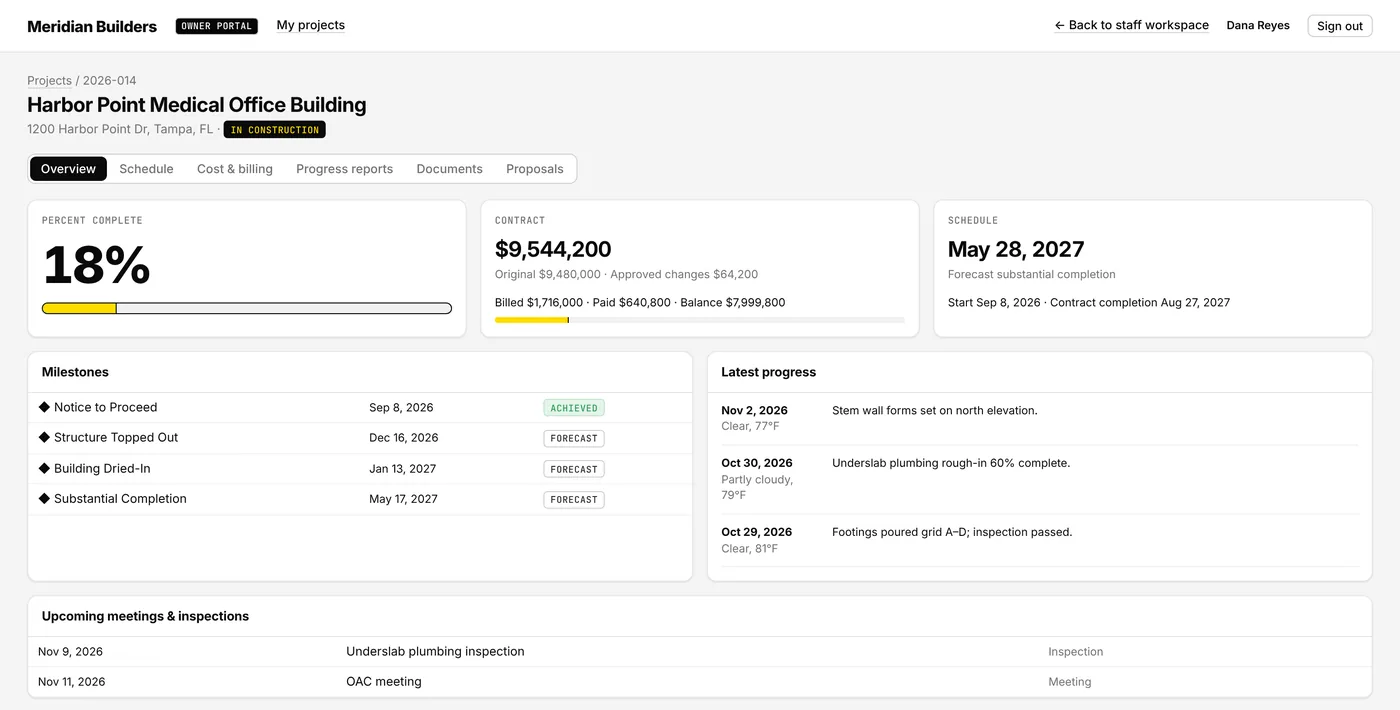
Owners see progress without calling you.

Clients get their own login with percent complete, milestones, contract and billing, shared documents and daily reports. They can review and accept proposals there too.

  • Unlimited client logins on every Pro and Elite plan, at no extra cost
  • You choose which reports and documents each owner can see
  • Proposals print on your letterhead and can be accepted in the portal
Owner portal · project overview
Numerate owner portal showing 18 percent complete, contract and billing summary, forecast completion date, milestones and latest daily reports.
Access & audit

Who saw the numbers, and who changed them.

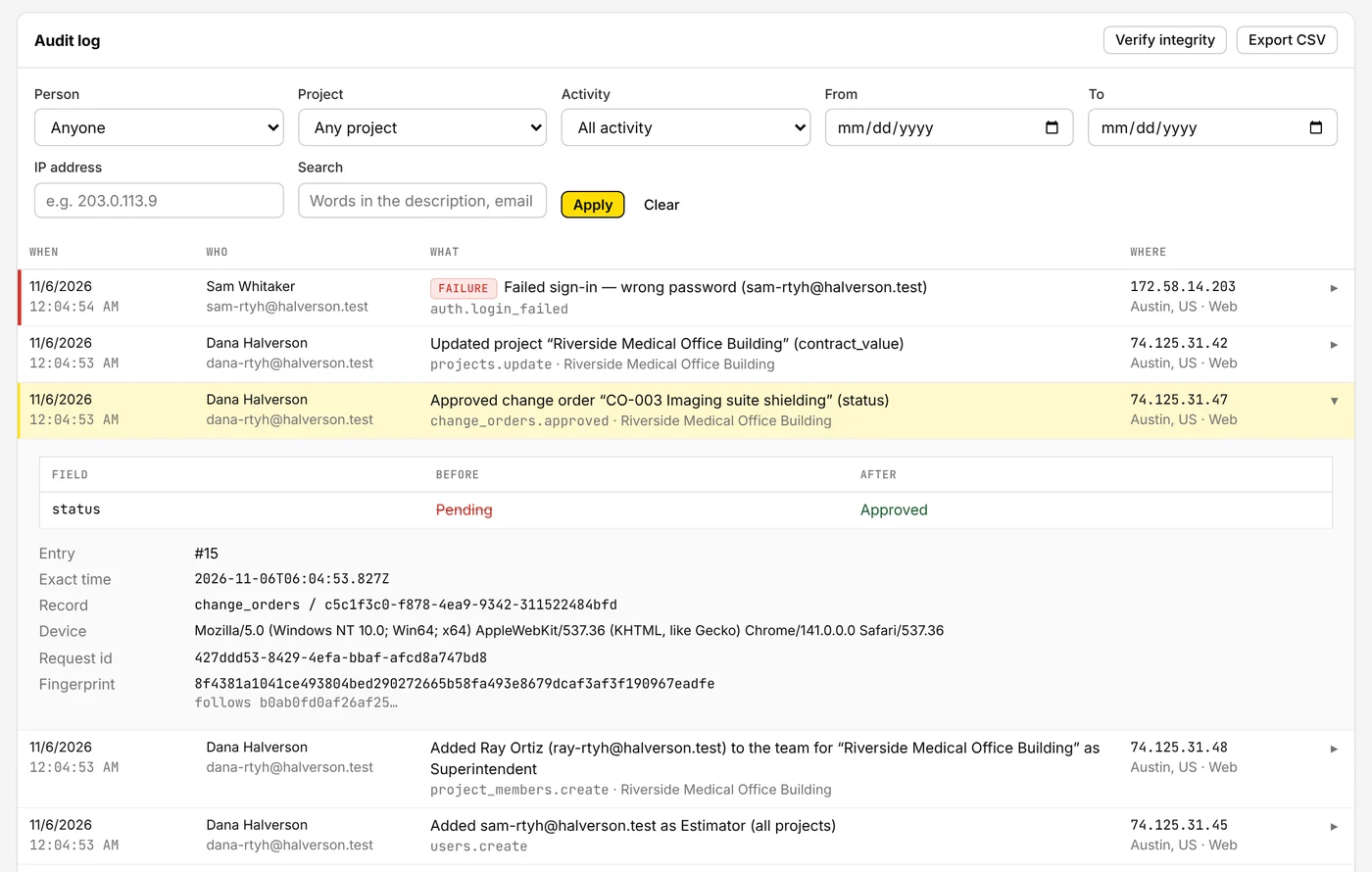
Give each person the access their job needs. Every sign-in, change, approval, download and export is written to a tamper-evident log with the person, time, place and device.

  • Roles for owners, executives, project managers, estimators, superintendents, accounting and viewers
  • Limit people to their teams' projects or the jobs they're assigned to
  • Dollar amounts are withheld by the server for roles that shouldn't see them
  • Each company's data sits in its own database
  • Two-step sign-in, lockout after repeated failures, and a tamper check on the audit log
Settings · Audit log
Numerate audit log listing a failed sign-in, a contract value update and an approved change order with its before and after status, IP address, location and device.
Referenced standards

Formulas cite the codes and practices your reviewers already use.

ACI 318 · 302.1R · 347CRSI Manual of Standard PracticeASTM A615 · E1745 · C636 AISC Steel Construction ManualTMS 402/602NRCA Roofing Manual NFPA 10 · 13 · 70ASHRAE 62.1 · 90.1SMACNA duct standards IPC · IBC · IECCOSHA 1926 Subpart PAACE 18R-97 · 56R-08CSI MasterFormat

Numerate reproduces the governing relationships, not the text of these publications, and is not affiliated with or endorsed by these organizations. Confirm the code edition adopted by your jurisdiction.

Pricing

Priced per company.
Users included.

14-day free trial

Full Pro features. No credit card, so nothing renews unless you choose a plan. If you don't, your account becomes read-only and nothing is deleted.

Extra users

$10 per user per month beyond the seats included in your plan. Owner portal logins are always free.

AI takeoff credits Coming soon

Prepaid packs, never billed after the fact. One credit will analyze one sheet. Packs go on sale when AI takeoff launches.

100 credits$15
500 credits$65
2,000 credits$220
Desktop app

Run Numerate from your dock or taskbar.

The desktop app opens straight into your company's workspace and keeps itself up to date. Your subscription and data live in your Numerate account, so you can sign in from the office, the trailer or a browser.

Numerate also runs in any current version of Chrome, Edge, Safari or Firefox.

FAQ

Questions estimators ask first.

Do I need a credit card to try it?

No. Every new company gets 14 days of the Pro plan with no card on file. Choose a plan any time during the trial and the remaining trial days carry over.

How do renewals and cancellation work?

Paid plans renew automatically each month or year until you cancel. Cancel any time in Settings → Plan & billing → Manage billing; you keep access until the end of the period you've paid for. Your account then becomes read-only and your data stays put until you delete it. See the Refund Policy.

Who counts as a user?

Anyone on your team who signs in to build estimates, schedules or proposals. Owners and clients who use the owner portal are free and unlimited.

Where do the unit costs come from?

From your company's cost database. Numerate ships with starter items so you can see how it works, and you replace them with your historical costs, supplier and subcontractor quotes, or a licensed cost data source. You can import and export the database as CSV.

How will AI takeoff billing work?

AI takeoff is in development. When it launches it will run on prepaid credits on the Pro and Elite plans: you pick the sheets to analyze, each sheet uses a credit, and the feature pauses when the balance reaches zero, so you're never billed for usage you didn't buy. Manual on-screen takeoff is included in Pro and Elite today at no extra cost.

Where is our data stored, and can we delete it?

On Cloudflare's network in the United States. Each company's projects, estimates and documents live in that company's own database, separate from every other customer's, and files are encrypted at rest. An owner can download everything as a file, or delete the company account, from Settings → Company data. See the Privacy Policy.

Can we keep field staff from seeing costs?

Yes. Superintendents and viewers don't see contract values, unit costs, markups, change order amounts or pay applications. Those fields are removed before the data leaves our servers, not just hidden on screen. Elite customers can build their own roles from the same permission list.

Can we see who did what?

Every company has an audit log of sign-ins (including failed ones), every change with the before and after values, approvals, role changes, proposal sends, downloads, prints and exports. Entries can't be edited or deleted from Numerate, a built-in check reveals any alteration, and you can export the log to CSV.

Price your next job with the numbers behind it.

Start your free trial